[스프링부트와 AWS로 혼자 구현하는 웹 서비스]를 읽고 따라하기.
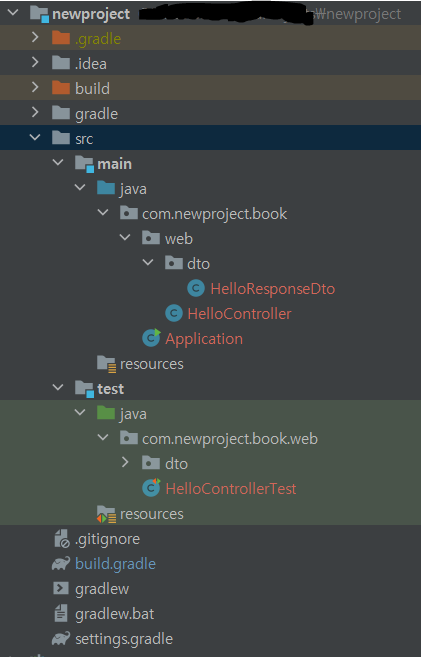
- 인텔리제이 처음 설치
- 포트번호 8080 비워둠
- (오라클관련 TNSLSNR.exe 가 실행되고 있었음. 포트 킬 해주기.)
1. build.gradle
buildscript{
    ext{
        springBootVersion = '2.1.7.RELEASE'
    }
    repositories{
        mavenCentral()
        jcenter()
    }
    dependencies{
        classpath("org.springframework.boot:spring-boot-gradle-plugin:${springBootVersion}")
    }
}
apply plugin : 'java'
apply plugin : 'eclipse'
apply plugin : 'org.springframework.boot'
apply plugin : 'io.spring.dependency-management'

group 'com.newproject.book'
version '1.0-SNAPSHOT'
sourceCompatibility=1.8

repositories {
    mavenCentral()
}

dependencies {
    compile('org.springframework.boot:spring-boot-starter-web')
    compileOnly('org.projectlombok:lombok')
    annotationProcessor("org.projectlombok:lombok")
    testCompile group :'org.assertj', name:'assertj-core', version:'3.6.1'
    testCompile('org.springframework.boot:spring-boot-starter-test')


}
- dependencies의 lombok부분은 gradle 버전 5이상에서 적용할 수 있는 코드임
- spring의 pom.xml같은 것
2. Test코드 작성
2-1) Application.java 작성
package com.newproject.book;

import org.springframework.boot.SpringApplication;
import org.springframework.boot.autoconfigure.SpringBootApplication;

@SpringBootApplication
public class Application {
    public static void main(String[] args){
        SpringApplication.run(Application.class, args);
    }
}
- SpringBootApplication 어노테이션 설정. 최상단 클래스에 붙여주도록 한다.
2-2) HelloController.java
package com.newproject.book.web;

import com.newproject.book.web.dto.HelloResponseDto;
import org.springframework.web.bind.annotation.GetMapping;
import org.springframework.web.bind.annotation.RequestParam;
import org.springframework.web.bind.annotation.RestController;

@RestController
public class HelloController {

    @GetMapping("/hello")
    public String hello(){
        return "hello:)";
    }

}
2-3)HelloControllerTest.java (test)
package com.newproject.book.web;


import org.junit.Test;
import org.junit.runner.RunWith;
import org.springframework.beans.factory.annotation.Autowired;
import org.springframework.boot.test.autoconfigure.json.AutoConfigureJsonTesters;
import org.springframework.boot.test.autoconfigure.web.servlet.WebMvcTest;
import org.springframework.test.context.junit4.SpringRunner;
import org.springframework.test.web.servlet.MockMvc;

import static org.hamcrest.Matchers.is;
import static org.springframework.test.web.servlet.request.MockMvcRequestBuilders.get;
import static org.springframework.test.web.servlet.result.MockMvcResultMatchers.*;

@RunWith(SpringRunner.class)
@WebMvcTest(controllers = HelloController.class)
public class HelloControllerTest {

    @Autowired
    private MockMvc mvc;

    @Test
    public void sayhello() throws Exception {

        String hello = "hello:)";
        mvc.perform(get("/hello"))
                .andExpect(status().isOk())
                .andExpect(content().string(hello));
    }


}- 테스트 코드 작성
- Mocking 방식
3. Lombok
ctrl+shift+a plugins 들어가서 marketplace - Lombok설치
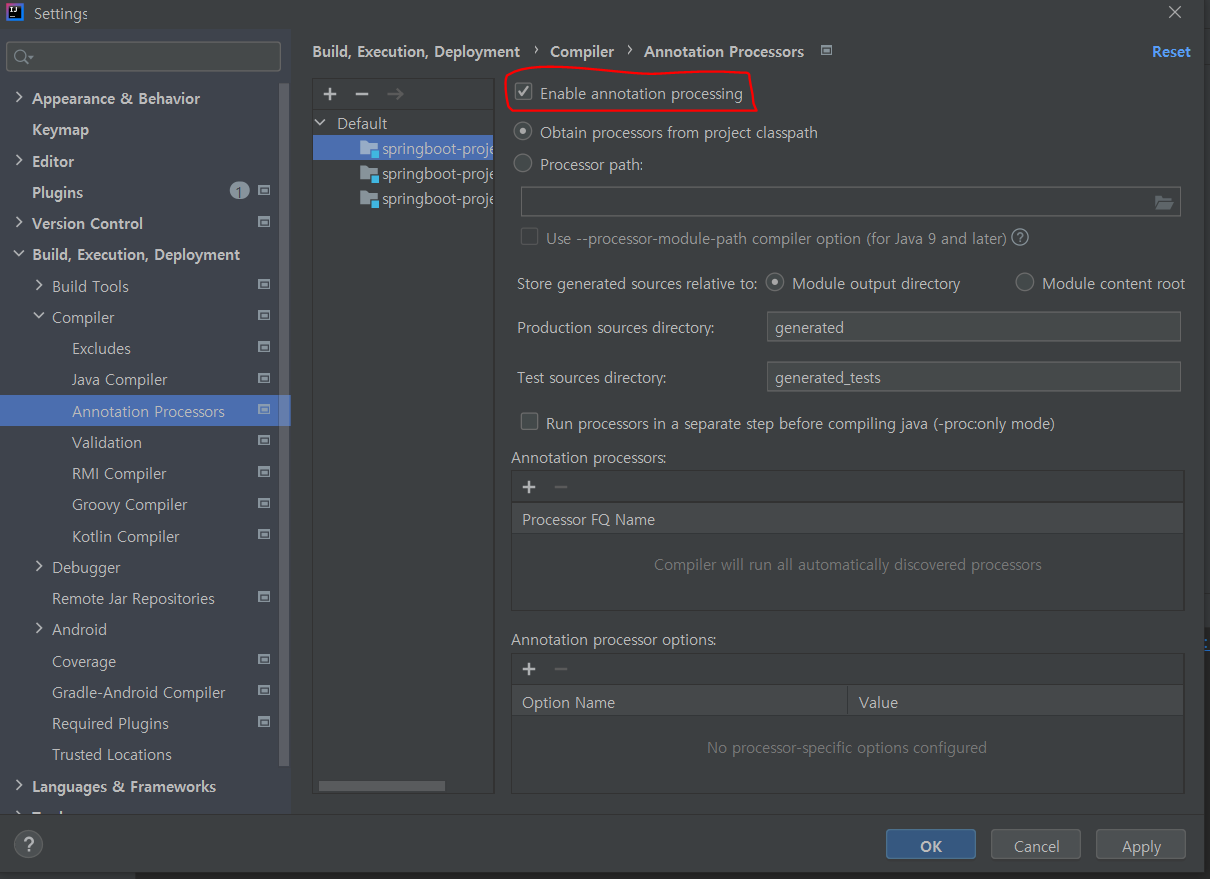
위와같이 어노테이션 세팅도 해준다.
3-1) HelloResponseDto.java
package com.newproject.book.web.dto;

import lombok.Getter;
import lombok.RequiredArgsConstructor;

@Getter
@RequiredArgsConstructor
public class HelloResponseDto {
    private final String name;
    private final int amount;
}
- dto에 required args와 final키워드를 쓰는 이유?
3-2)HelloResponseDtoTest (test)
package com.newproject.book.web.dto;

import org.junit.Test;
import static org.assertj.core.api.Assertions.assertThat;

public class HelloResponseDtoTest {

    @Test
    public void lombokTest(){

        String name = "test";
        int amount = 1000;

        HelloResponseDto dto = new HelloResponseDto(name, amount);

        assertThat(dto.getName()).isEqualTo(name);
        assertThat(dto.getAmount()).isEqualTo(amount);
    }
}
3-3) HelloController
@GetMapping("/hello/dto")
  public HelloResponseDto helloDto(@RequestParam("name") String name, @RequestParam("amount") int amount){
  return new HelloResponseDto(name, amount);
}
3-4) HelloControllerTest(test)
    @Test
    public void sayhelloDto() throws Exception{
        String name="hello";
        int amount=1000;

        mvc.perform(
                get("/hello/dto")
                        .param("name", name)
                        .param("amount", String.valueOf(amount)))
                .andExpect(status().isOk())
                .andExpect(jsonPath("$.name", is(name)))
                .andExpect(jsonPath("$.amount", is(amount)));

    }
- Tdd 확인
- Mock, Stub방식
- https://repo.yona.io/doortts/blog/issue/1